A factory reset returns a phone, tablet or computer to a clean starting state. It is useful before selling a device, troubleshooting a persistent problem or beginning again with a new configuration. The word “factory,” however, can make the process sound broader than it is.
The reset removes the user environment
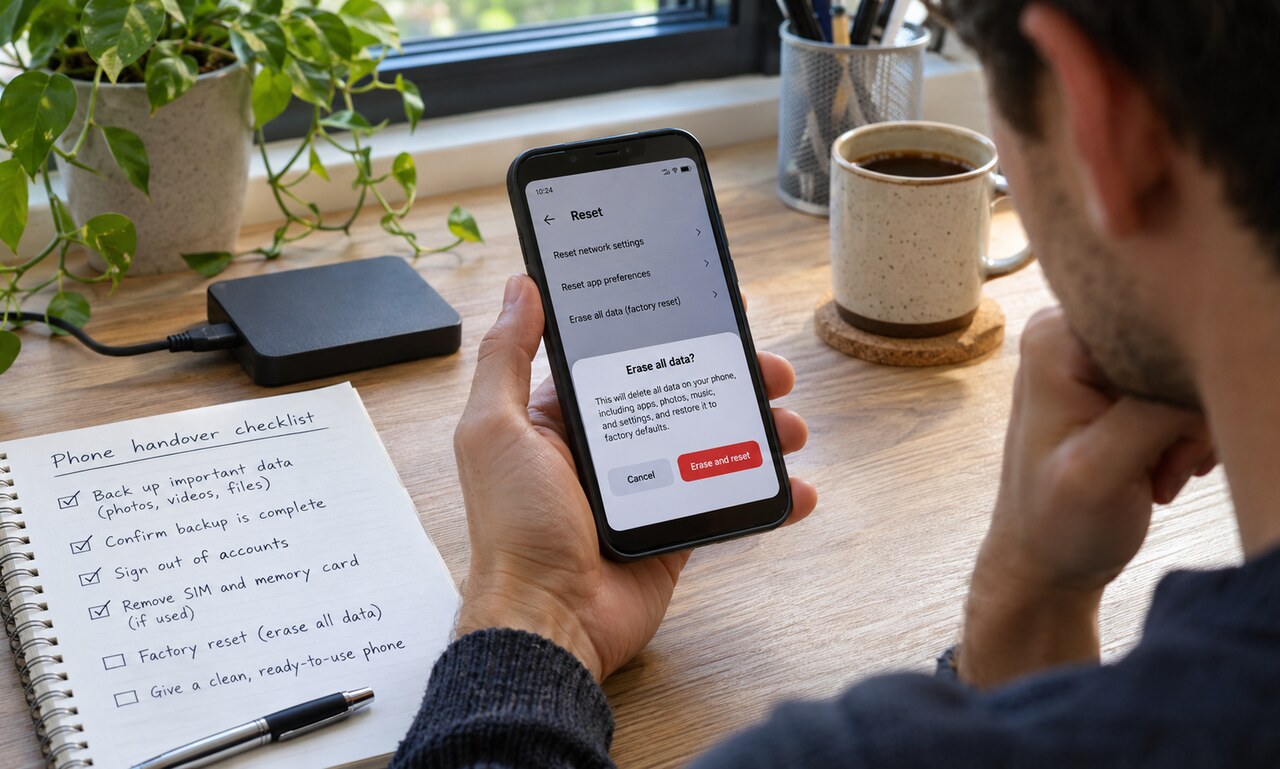
On a modern phone, a reset typically deletes user accounts, installed apps, local messages, settings and files stored in the device's user-data area. The operating system remains and starts its setup process again.
Many devices protect storage with encryption. Resetting can discard the keys that made the old user data readable, then prepare a fresh encrypted environment. This is one reason current devices can erase large amounts of information quickly.
Cloud copies remain elsewhere
Photos, contacts, notes and messages synchronized to an online account are not necessarily deleted from that account. They may return when the owner signs in again or remain available on other devices. A reset affects the local device, not every copy stored by a service.
Before resetting, confirm that important information has finished backing up. Afterward, review the account's device list and remove the old device if it is being transferred.
Removable storage needs its own decision
A memory card may not be erased unless the reset screen explicitly includes it. Remove the card before handing over the device or format it separately after making any required backup. A physical SIM or other removable identity module should also be taken out.
Electronic SIM profiles may have a separate erase option. The correct choice depends on whether the device is staying with the same owner.
Activation locks can survive
Anti-theft systems may link the hardware to an account even after local data is cleared. Sign out properly and follow the manufacturer's transfer steps so the next owner can activate the device without needing the previous password.
A factory reset is an important privacy step, but it is one part of a handover checklist: back up, sign out, remove storage and service profiles, reset, then confirm that the welcome screen appears without the old account. The result should be a clean device and no unintended path back to the previous owner's information.
READ NEXT